
Compare
Score and rank two or three sites under one shared catchment and time window.
Set up
- Open Compare, or click Compare from a site in Location Insights (it is preloaded).
- Add location (2 to 3): search a place, pick a saved site, or enter latitude and longitude with + Use point. You can rename each point.
- Choose a Method: Radius (default 1 km), Drive time, or True trade area (50/70/90/100%).
- Set the Time range (default Last 30 days).
- Click Generate (it reads "Add 2 locations" until enough sites are added). A run takes about 25 seconds with a radius.
- Save analysis to a project.
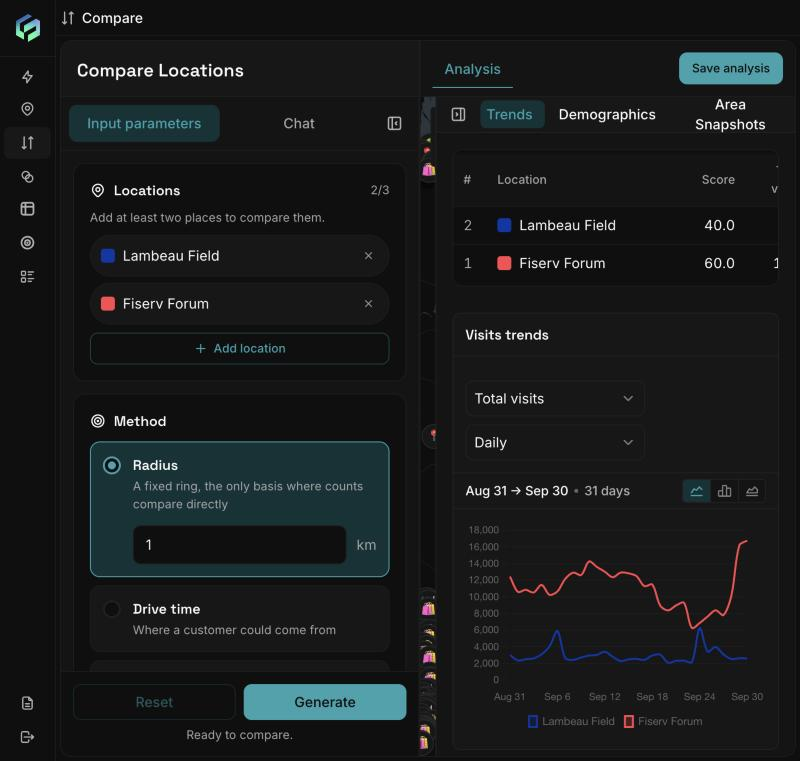
Compare: locations and method on the left, results on the right. Scores (Lambeau Field 40, Fiserv Forum 60) and the visit trends for both sites.
The five pillars
| Pillar | Measures |
|---|---|
| Traffic volume | Total visits and observed devices |
| Dwell quality | Average stay and share of longer, intentional visits |
| Spending power | Median home value and share of top-income households |
| Audience | Share with college+ education, married, homeowners |
| Market size | Total residents |
Composite score:
Each metric is scaled 0-100 within the comparison (best 100, worst 0). Pillars average their metrics; the composite is a weighted blend (traffic and spending weigh most, market size least). Scores are relative: a low score means "weaker than the others here", and swapping a site changes every score. With two sites each pillar is 0 or 100, so read the raw figures for the real gap.
Result tabs
- Analysis: score table (rank, composite, pillars, total visits, visits per day, average dwell in minutes) and a map. The table lists sites in the order added; rank is in the "#" column.
- Trends: visits over time, day-part shares, weekday heat maps per site.
- Demographics: People, Households, Financial, Education.
- Area Snapshots: Places, Performance, Operating hours.
Example: Fiserv Forum (Milwaukee) scored 60 vs Lambeau Field 40 on a 1 km radius, with 349.5k vs 95.3k visits and 130 vs 203 minutes average dwell.
If a site has insufficient data, the comparison stops and identifies the affected location. Widen the time window or catchment area and try again.
Is this conversation helpful so far?
Updated about 2 hours ago